
 Price Match Guarantee
 Free Shipping

Oracle Smart Touch RGB Dimmer - 9053-504

This wheel on real customer builds
See this part on video
Made by our team · tap a video to play it

📧 Get Fitment Help
Verify parts fit & get product recommendations
ORACLE Lighting
SKU:
ORL9053-504
|
- UPC:
- 905350420129
$133.00
Other ORACLE Lighting kits for this car
Fits these vehicles
Fitment not listed for this part yet — call or text 813-535-5801 and we will confirm it for your car.
Part details
- Part number
- ORL9053-504
- Manufacturer part number
- 9053-504
- UPC
- 905350420129
- Brand
- ORACLE Lighting
- Part type
- Light Accessories and Wiring
- Prop 65
- ⚠️ WARNING: This product can expose you to chemicals which are known to the State of California to cause cancer. For more information, go to www.P65Warnings.ca.gov
- Special order
- Yes — ordered in for you; allow extra time
- Box size:
- 9.00 × 4.00 × 9.00 (in)
Finance it — pay over time
 Bad credit or no credit? No problem. Lease-to-own with Snap Finance: no credit needed, approvals up to $5,000, as low as /week. Get started
Low monthly payments
Affirm, Klarna or PayPal Pay Later: see your exact plan at checkout. Checking won’t affect your credit score.
Bad credit or no credit? No problem. Lease-to-own with Snap Finance: no credit needed, approvals up to $5,000, as low as /week. Get started
- Affirm
- Klarna
- PayPal Pay Later
- Snap Finance
📧 Get Fitment Help
Verify parts fit & get product recommendations
Complete the job
Read before you buy
-

-
-
Oracle 22AWG 4 Conductor RGB Installation Wire 100M (328ft) Spool - RGB - 2006-504
$193.00Free Shipping
-


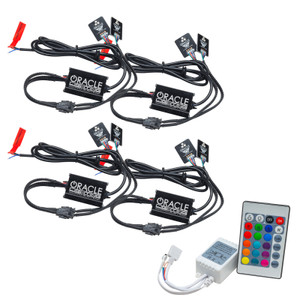
The ORACLE Touch Panel RGB DImmer is a newly developed high-end controller. It adopts a glass panel design, giving it a modern, sleek appearance. It has a high precision touch control chip, that increases touch sensitivity and reduces mistaken triggers. These control panels are specially used for controlling a variety of LED Lighting. For example like RGB Flex LED Lighting Strips, wall washer lights, panel lights, etc. Easy to connect, easy to use features such as jump changing, gradual changing, strobe, flash as well as other modes. Description: The Power Button: 1)A short press turns the controller on/off at any state. 2) A long press cycles between 3 different modes (shown by indicators). Indicator 1: Indicates that RGB mode is selected. Indicator 2: Indicates that color temperature mode is selected. Indicator 3: Indicates that dimmer mode is selected. The Left Arrow Button: is used to increase parameters (settings). The Right Arrow Button: is used to reduced parameters (settings). Function Instruction RGB Mode: A short press of the Left Arrow Button increases the mode within the RGB Function. A long press of the Left Arrow Button increases the brightness or speed. A short press of the Right Arrow Button reduces the mode. A long press of the Right Arrow Button reduces the brightness or speed. Mode Changes table: NOTE: This table shows the outputs while testing on an ORACLE 2.0 RGB Flex strip. Functions may be different when using other types of RGB strips.
Dimmer boast easy to install and easy to use features.
Smart Touch RGB Dimmer
- High precision chip to reduce mistaken triggers
- Clearance Item:
- N
- LTL:
- N
- MPN:
- 9053-504
- Proposition 65:
- Y
- Special Order:
- Y
PRODUCT REVIEWS (0)
Overall Rankings
Have you tried this product?
WRITE A REVIEWNo reviews for this product yet. Be the first to write a review!
Write a Review
ORACLE Lighting
Oracle Smart Touch RGB Dimmer - 9053-504
Oracle Smart Touch RGB Dimmer - 9053-504 FAQ
Most direct-fit lights plug into the factory connector. Light bars and auxiliary lights need a wiring harness and switch, included when the Part details say so.
Cars that check the bulb load can flag an LED; the maker says when a resistor or adapter is required.
DOT-marked headlights and tail lights are made for road use. Off-road light bars are for off-road use only, as the maker's listing states.
Yes. Aim headlights after installing them so they light the road without dazzling other drivers.
Sealed housings resist water; the Part details list the rating when the maker states one.
Yes — monthly options show right under the Add to Cart button. Affirm, Klarna, PayPal Pay Later and Snap Finance are offered at checkout, and checking what you qualify for does not affect your credit score.
Install and care: lighting
Before you start
- Disconnect the battery before unplugging the factory lights.
- Check the maker's note on resistors or adapters for your car.
Do
- Aim the headlights after fitting them.
- Route the harness away from heat and moving parts, and seal the connectors.
Don't
- Don't use off-road lights on public roads.
- Don't leave a connector unsealed where water can reach it.