
 Price Match Guarantee
 Free Shipping


Autometer Airdrive WiFi OBD-II Control Module - 9110

This wheel on real customer builds
See this part on video
Made by our team · tap a video to play it

📧 Get Fitment Help
Verify parts fit & get product recommendations
AutoMeter
SKU:
ATM9110
|
- UPC:
- 046074091100
$274.66
Other AutoMeter kits for this car
Fits these vehicles
Fitment not listed for this part yet — call or text 813-535-5801 and we will confirm it for your car.
Part details
- Part number
- ATM9110
- Manufacturer part number
- 9110
- UPC
- 046074091100
- Brand
- AutoMeter
- Part type
- Gauges
- Prop 65
- ⚠️ WARNING: This product can expose you to chemicals which are known to the State of California to cause cancer. For more information, go to www.P65Warnings.ca.gov
- Special order
- Yes — ordered in for you; allow extra time
- Instructions
- Installation instructions (PDF)
Installation guide (from AutoMeter)
Hosted by AutoMeter. Follow the maker's instructions and torque specs.
- Box size:
- 4.50 × 4.40 × 4.90 (in)
Finance it — pay over time
 Bad credit or no credit? No problem. Lease-to-own with Snap Finance: no credit needed, approvals up to $5,000, as low as /week. Get started
Low monthly payments
Affirm, Klarna or PayPal Pay Later: see your exact plan at checkout. Checking won’t affect your credit score.
Bad credit or no credit? No problem. Lease-to-own with Snap Finance: no credit needed, approvals up to $5,000, as low as /week. Get started
- Affirm
- Klarna
- PayPal Pay Later
- Snap Finance
📧 Get Fitment Help
Verify parts fit & get product recommendations
Complete the job
Read before you buy

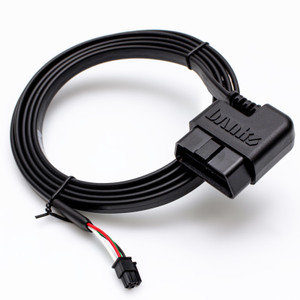
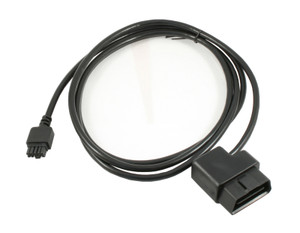
AutoMeter’s new state of the art AirDrive module provides a plug and play solution that wirelessly transmits data through a secure WiFi network from your vehicle to our award winning AirDrive gauges. Program configurable colors, warning points and peak recall functions through AutoMeter’s free AirDrive smartphone app. Quick and easy installation is as simple as plugging the control module into the vehicle’s OBDII port, mounting and powering gauges, and connecting to the mobile app, eliminating any fear of voiding factory warranties on your new vehicle. The AirDrive system is capable of broadcasting two additional analog sensor inputs to deliver information not found on your vehicle’s data bus. Take plug and play performance to the next level with the AutoMeter AirDrive system.
AIRDRIVE WiFi OBD-II MODULE
- Works with most 1996 and newer OBDII vehicles. Download the free iOS or Android AirDrive App to verify compatibility and available parameters.
- For use with AutoMeter’s AirDrive gauges and mobile app
- Two additional sensor inputs for expanded parameters
- WiFi connectivity to smart phone or tablet devices
- Micro USB port for PC update
- Clearance Item:
- N
- LTL:
- N
- MPN:
- 9110
- Proposition 65:
- Y
- Special Order:
- Y
PRODUCT REVIEWS (0)
Overall Rankings
Have you tried this product?
WRITE A REVIEWNo reviews for this product yet. Be the first to write a review!
Write a Review

AutoMeter
Autometer Airdrive WiFi OBD-II Control Module - 9110
Autometer Airdrive WiFi OBD-II Control Module - 9110 FAQ
The maker's installation guide is on this page — see Installation guide under the part details for the step-by-step and the torque figures. Work on level ground with the car properly supported, and torque every fastener to the maker's figure. If the job is beyond your tools, any shop that does this kind of work can fit it.
What's in the box above lists what the maker includes when we have it, and the maker's guide names any tools or extra parts.
Many parts are bolt-on jobs with hand tools; the maker's guide on this page shows the steps and the torque figures. If it is beyond your tools, a shop can fit it.
Check the vehicle list above against your exact year and trim before ordering. If something is off, call or text us at 813-535-5801 and we will sort it out.
Yes — monthly options show right under the Add to Cart button. Affirm, Klarna, PayPal Pay Later and Snap Finance are offered at checkout, and checking what you qualify for does not affect your credit score.
Install and care: Gauges
- Before you start, read the maker's guide on this page end to end and lay out every part against the What's in the box list.
- Do torque every fastener to the maker's figure with a torque wrench, and re-check it after the first drive.
- Don't force a part that does not line up: check the vehicle list on this page against your exact year and trim first.